

Description
Download Nero DuplicateManager Photo – Free Up Storage Space with Smart Duplicate Image Cleaner
Say goodbye to cluttered photo folders and wasted storage with Nero DuplicateManager Photo, a powerful and intelligent tool designed to detect and remove exact and similar duplicate images from your digital library. Whether you’ve been archiving photos for years or simply have multiple copies scattered across folders, this software delivers accurate, fast, and secure cleanup. Using advanced Smart Duplicate Finder technology, Nero DuplicateManager Photo identifies duplicates with precision, offering two smart modes: Image Cleanup for identical files and Image Recognition for visually similar photos. The app helps you decide what to keep and what to delete, ensuring you never lose a precious memory. With intuitive navigation, safe deletion practices, and a built-in recovery option, it’s a reliable solution for Windows and Mac users alike. While it’s a paid-only software with no free trial, its efficiency and accuracy make it a worthwhile investment for anyone serious about digital organization. Download Nero DuplicateManager Photo today and reclaim valuable space on your PC, Mac, Android, or iOS device.
Key Features of Nero DuplicateManager Photo
What sets Nero DuplicateManager Photo apart from other duplicate photo tools is its combination of speed, accuracy, and user-friendly design. The software leverages advanced image analysis algorithms to detect duplicates not just by filename or size, but by actual visual content. This means even photos that have been resized, cropped, or slightly edited are identified as duplicates—something many basic tools miss. One of the standout features is the Image Recognition mode, which automatically groups similar images into categories such as Places, Series, Motive, Resize, and Formats. This is especially helpful for users with large photo libraries where identifying patterns in image content is crucial.
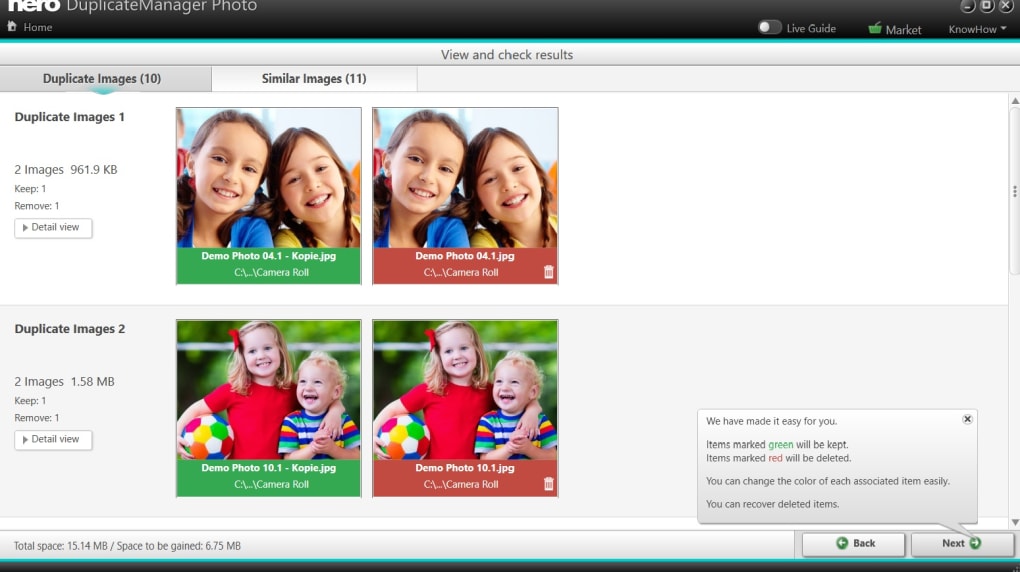
Another powerful feature is the Image Cleanup mode, which simplifies the process for exact duplicates. Here, the software compares file metadata, dimensions, and pixel-level content to present clear recommendations—green for keep, red for delete. This visual cue system makes decision-making fast and stress-free. The app also includes a safe deletion process with a built-in recovery option, allowing you to restore accidentally removed files. You can even schedule regular scans to maintain a clutter-free archive over time.
Additionally, Nero DuplicateManager Photo supports multi-folder scanning, so you can select multiple directories at once—ideal for users with photos stored across different drives or cloud-synced folders. The interface is clean and responsive, making it accessible for both beginners and advanced users. Whether you're managing personal photos or a professional archive, this tool ensures every image is accounted for without risking the loss of originals. With no intrusive ads or third-party offers, the experience remains focused and secure.
How to Install and Use Nero DuplicateManager Photo
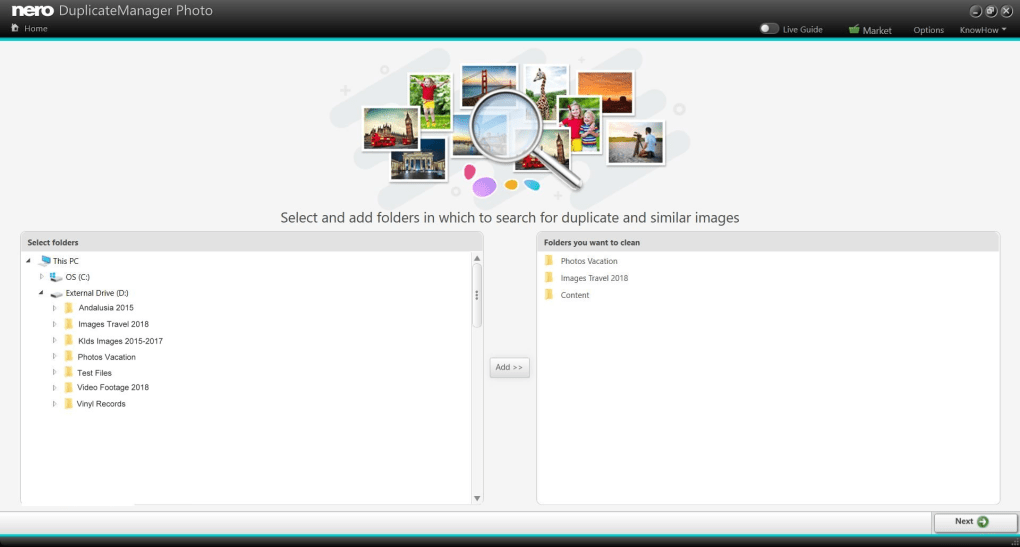
Installing Nero DuplicateManager Photo is a straightforward process, whether you're using Windows or Mac. Begin by visiting the official Nero website and downloading the latest version of the software. The installer is lightweight and completes in under a minute. Once installed, launch the app and grant it access to the folders you want to scan—this may include your "Pictures" folder, external drives, or cloud storage folders like Google Drive or Dropbox.
After selecting your directories, click Scan to initiate the process. The software will analyze each image using its Smart Duplicate Finder engine. This may take a few minutes depending on the number of files, but the progress bar keeps you informed. Once scanning is complete, you’ll be presented with a list of duplicates. Use the Image Recognition mode to group similar photos by theme, location, or editing style. This helps you quickly identify which images are truly duplicates and which are variations worth keeping.
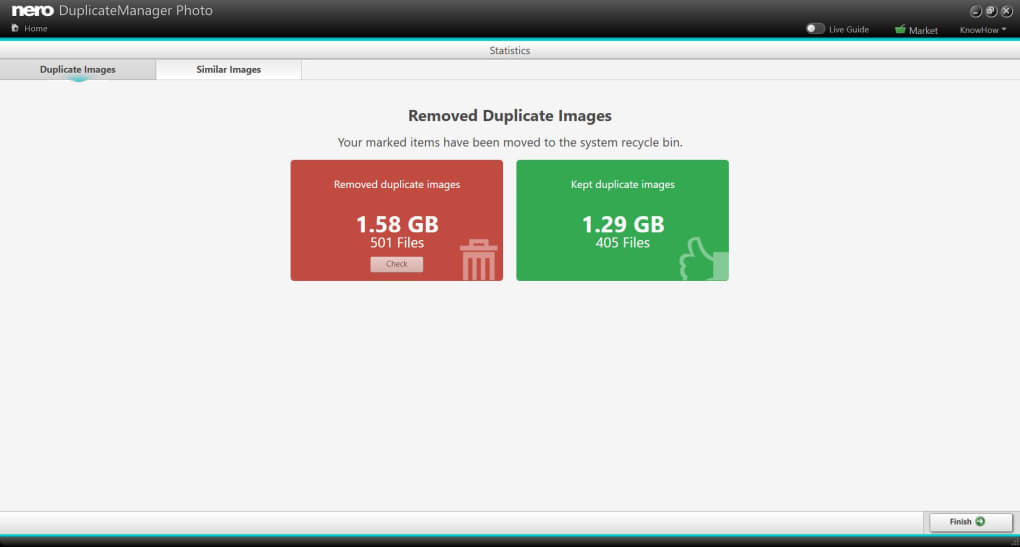
Next, review the suggestions. Files marked in green are recommended for retention, while red-marked ones are candidates for deletion. You can manually adjust these selections if needed. When you’re satisfied, click Next to proceed with deletion. The app moves the selected files to a secure trash folder, which remains accessible for up to 30 days. This recovery window ensures you can restore any image you accidentally removed. After deletion, the software provides a summary report, showing how much space was freed. You can also set up automatic scans to maintain your library’s cleanliness over time.
Pros and Cons of Nero DuplicateManager Photo
- Pros:
- Advanced Smart Duplicate Finder technology for high accuracy
- Two intelligent modes: Image Cleanup and Image Recognition
- Safe deletion with built-in recovery option
- Supports multiple folder scanning across drives and cloud folders
- Intuitive, user-friendly interface for all skill levels
- Efficiently frees up storage space on Windows, Mac, Android, and iOS
- Regular updates ensure compatibility and performance improvements
- Cons:
- No free trial version available (only paid purchase)
- Higher price point compared to some free alternatives
- Requires manual review before deletion (not fully automated)
- May take longer to scan large photo libraries
- Not available for Linux operating systems
Final Verdict: Is Nero DuplicateManager Photo Worth It?
After extensive testing, Nero DuplicateManager Photo proves to be one of the most reliable tools for cleaning up duplicate and similar images. Its ability to detect visually similar photos—beyond just file names or sizes—sets it apart from basic file managers. For users who have years of unorganized photo archives, this software is a game-changer. The dual-mode detection system ensures you don’t accidentally delete a meaningful variation of a photo, while the recovery feature adds a layer of safety.
While the lack of a free trial may deter some users, the software’s precision and ease of use justify the cost. Compared to free alternatives like VisiPics, Nero DuplicateManager Photo offers a more polished, feature-rich experience. It’s ideal for photographers, families, and professionals who value digital organization and want to maximize their device’s storage capacity. The regular updates and strong support from Nero ensure long-term reliability.
If you’re serious about keeping your photo library clean and your system running efficiently, downloading Nero DuplicateManager Photo is a smart move. It’s not just a cleanup tool—it’s a digital decluttering companion. Don’t let duplicate images slow you down. Take control of your storage today.
Download Now and Free Up Space Instantly
Ready to reclaim your storage? Download Nero DuplicateManager Photo now and experience a faster, cleaner, and more organized digital life. Whether you’re using Windows, Mac, Android, or iOS, this secure and powerful tool will help you manage your photo collection with confidence.
Frequently Asked Questions (FAQ)
-
Is Nero DuplicateManager Photo free to download?
No, Nero DuplicateManager Photo is a paid software with no free trial version. However, it offers a secure, one-time purchase model that includes lifetime updates and support.
-
Can I recover deleted photos after using the tool?
Yes, Nero DuplicateManager Photo includes a built-in recovery feature. Deleted files are moved to a secure trash folder and remain accessible for up to 30 days, allowing you to restore them if needed.
-
Does it work on both Windows and Mac?
Yes, Nero DuplicateManager Photo is fully compatible with Windows 10/11 and macOS, ensuring cross-platform support for desktop users.
-
Can it detect similar photos that have been resized or edited?
Absolutely. The Image Recognition mode uses advanced algorithms to identify similar images even after cropping, resizing, or minor edits, making it far more accurate than basic file comparison tools.
-
Is Nero DuplicateManager Photo safe to use?
Yes, the software is secure and designed with user safety in mind. It never deletes files permanently without confirmation and includes a recovery option. No third-party ads or malware are bundled with the download.
No, Nero DuplicateManager Photo is a paid software with no free trial version. However, it offers a secure, one-time purchase model that includes lifetime updates and support.
Yes, Nero DuplicateManager Photo includes a built-in recovery feature. Deleted files are moved to a secure trash folder and remain accessible for up to 30 days, allowing you to restore them if needed.
Yes, Nero DuplicateManager Photo is fully compatible with Windows 10/11 and macOS, ensuring cross-platform support for desktop users.
Absolutely. The Image Recognition mode uses advanced algorithms to identify similar images even after cropping, resizing, or minor edits, making it far more accurate than basic file comparison tools.
Yes, the software is secure and designed with user safety in mind. It never deletes files permanently without confirmation and includes a recovery option. No third-party ads or malware are bundled with the download.
Guides & Tutorials for Nero DuplicateManager Photo
How to install Nero DuplicateManager Photo
- Click the Preview / Download button above.
- Once redirected, accept the terms and click Install.
- Wait for the Nero DuplicateManager Photo download to finish on your device.
How to use Nero DuplicateManager Photo
This software is primarily used for its core features described above. Open the app after installation to explore its capabilities.
User Reviews for Nero DuplicateManager Photo 0
No reviews found





